
Built for RYA Day Skipper & Yachtmaster students
Ditch the paper charts. Master your chartwork online.
An interactive digital chart plotter with RYA Training Chart 3. Plot courses to steer, fix positions, calculate tidal vectors — all in your browser. No Portland plotter. No dividers. No expensive kit.
60-second free trial. No signup required.
Manual chartwork is a pain
Every RYA student knows the struggle. You need a Portland plotter, dividers, a paper chart, a big table, a sharp pencil, and the patience of a saint. There has to be a better way to practise.
Expensive equipment
Portland plotters, Breton plotters, dividers, training charts — the cost adds up fast before you even start the course.
Need a flat surface
Paper charts require a large table. Good luck practising on a train, in a coffee shop, or at your desk.
Wear and tear
Charts get creased, pencil lines smudge, dividers slip. Every plotting mistake means erasing and starting over.
No instant feedback
With manual tools, you plot a course to steer and hope the vector triangle is right. There's no way to verify your work in real time.
The solution
Every navigation tool, right in your browser
ChartWork gives you a fully interactive RYA Training Chart 3 with all 12 plotting tools, course to steer solver, and tidal calculators. Open your laptop. Start plotting. It's that simple.


Full RYA Training Chart 3
High-resolution chart with smooth pan and zoom. Every buoy, depth contour, and tidal diamond — exactly as it appears on the exam chart.
Course to Steer Solver
Draw your CTS vector triangle directly on the chart. The quadratic solver calculates SOG automatically — drag handles to adjust in real time.
DR & EP Plotting
Plot dead reckoning and estimated positions with leeway and tidal stream vectors. Full T-M-C compass conversion chain built in.
Bearings, Dividers & Routes
12 precision tools including bearing lines, dividers for distance measurement, multi-leg route planning, 3-point fixes, and waypoint management.
Built-in Calculators
Speed/distance/time, ETA, Rule of Twelfths for tidal heights, and lat/long position plotting — all the maths handled for you.
Works on Any Device
Laptop, tablet, desktop — any modern browser. Practice chartwork on the sofa, on the train, or in the classroom. No software to install.
See it in action
A closer look at the tools
Real screenshots from the app. Every tool is designed to mirror the manual chartwork process — but faster, cleaner, and with instant feedback.

Full RYA Training Chart 3
The complete chart at 5000x7541 pixels — every depth contour, buoy, light, tidal diamond, and landmark. Smooth pan and zoom lets you work at any scale, from harbour approach to open water passage.
- Calibrated lat/long grid at 133.8 px per nautical mile
- Live cursor position in degrees, minutes, and decimals
- Zoom controls with percentage display
- Mini compass rose showing chart orientation
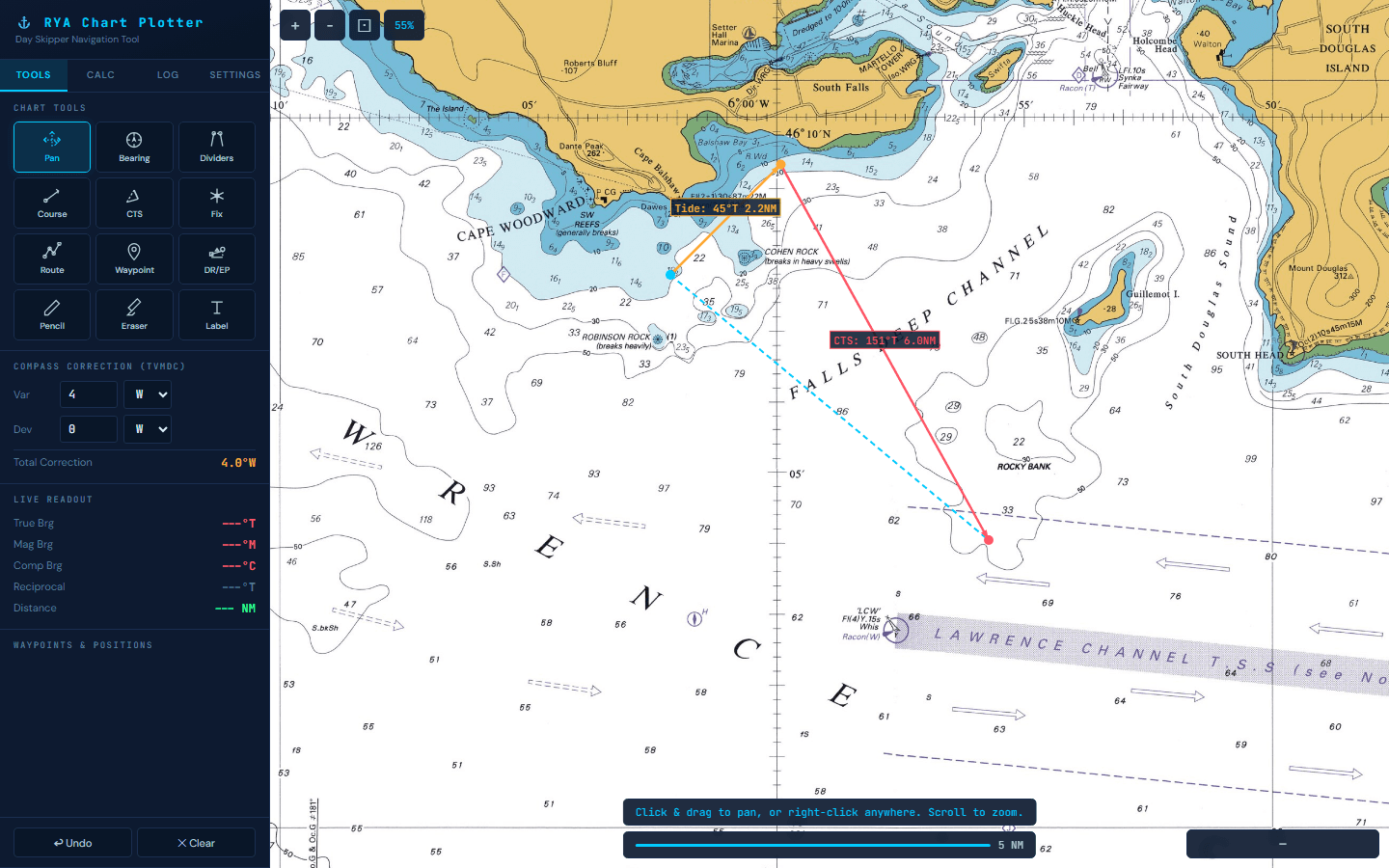
Course to Steer Solver
The CTS tool is the heart of chartwork practice. Click your start point and destination, enter the tidal set and rate, your boat speed — and ChartWork draws the complete vector triangle on the chart. It solves the quadratic equation for SOG and calculates passage duration automatically.
- Click start and destination directly on the chart
- Enter tidal set, rate, and boat speed
- Automatic SOG calculation via quadratic solver
- Drag handles to adjust — triangle updates live
- Click existing CTS elements to re-edit values
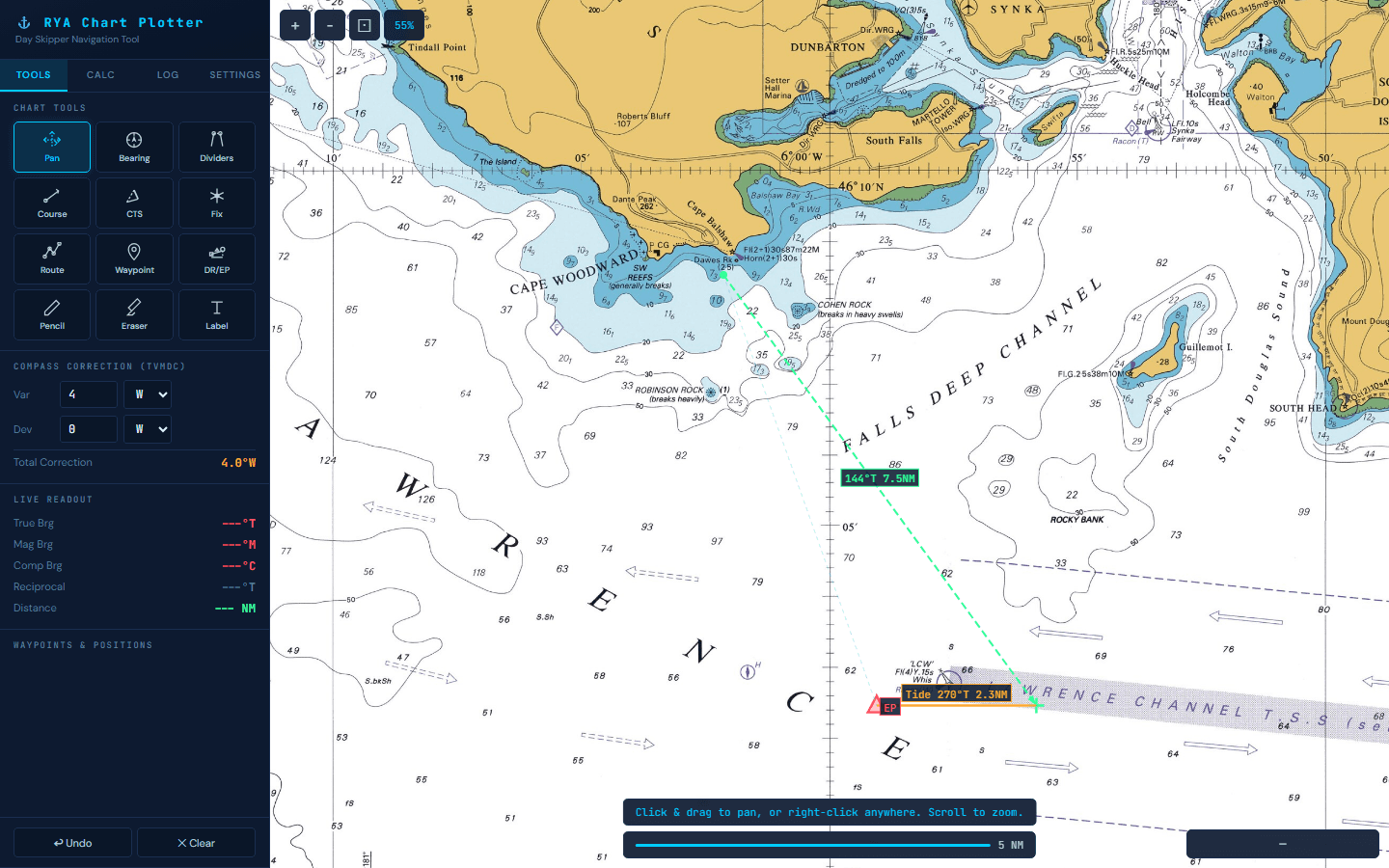
Dead Reckoning & Estimated Position
Plot DR and EP positions exactly as you would on paper. Enter your course steered (in compass degrees), boat speed, and duration. Then add leeway angle and wind direction for a DR position — or include tidal stream set and rate for a full EP. The tool handles the entire T-M-C compass conversion chain.
- Course steered with automatic compass-to-true conversion
- Leeway correction with port/starboard wind direction
- Tidal stream vector with set and rate inputs
- DR position (no tide) and EP position (with tide)
- Full variation and deviation corrections built in
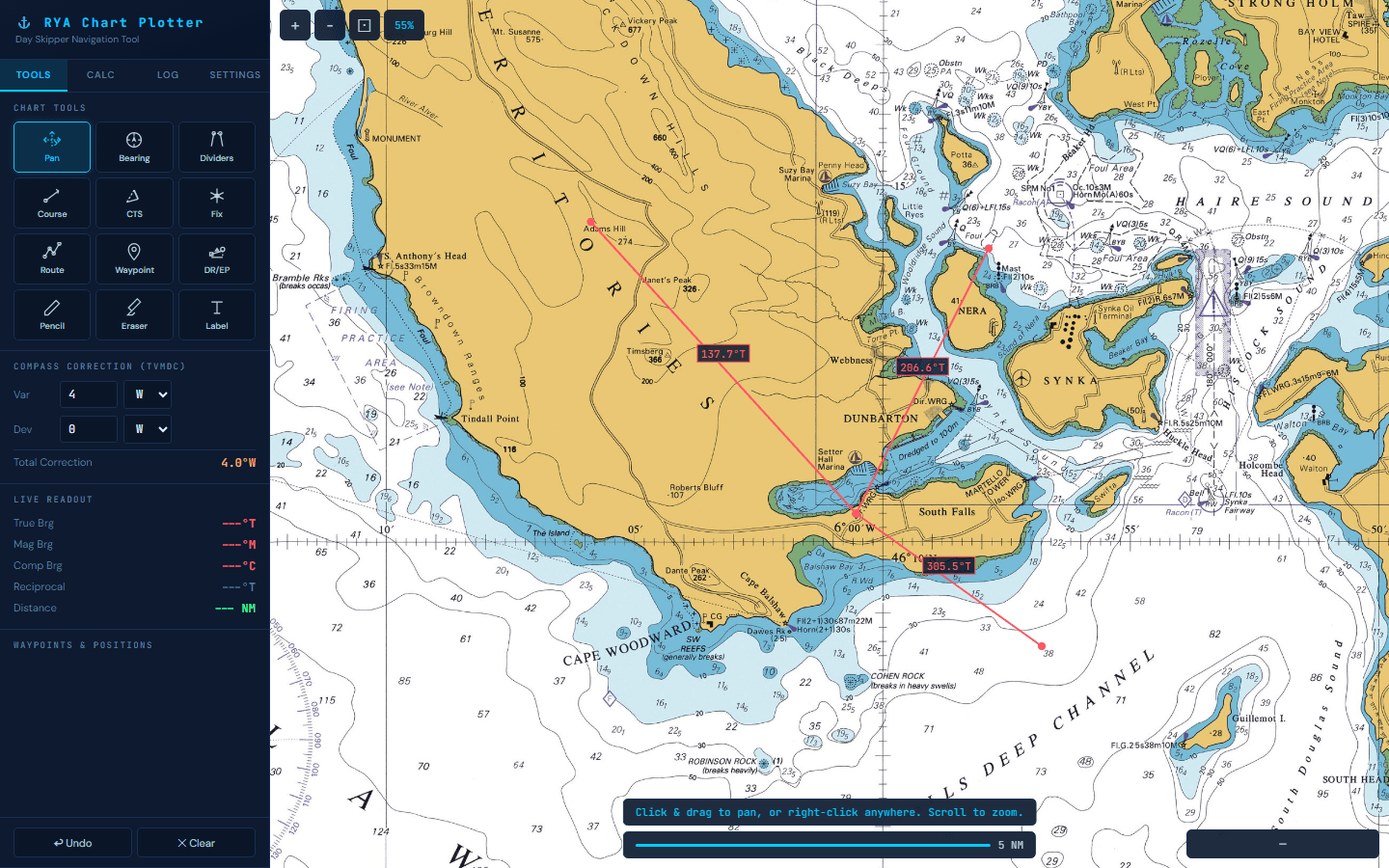
Bearings & Compass Correction
Take bearings between any two points on the chart with a single click-and-drag. The live readout shows True, Magnetic, and Compass bearings simultaneously — with your variation and deviation settings applied automatically. The reciprocal bearing is always displayed too, ready for back-bearings and position fixes.
- Click and drag to measure any bearing on the chart
- Live True, Magnetic, and Compass bearing readout
- Adjustable variation (E/W) and deviation (E/W)
- Automatic reciprocal bearing calculation
- Distance measurement in nautical miles
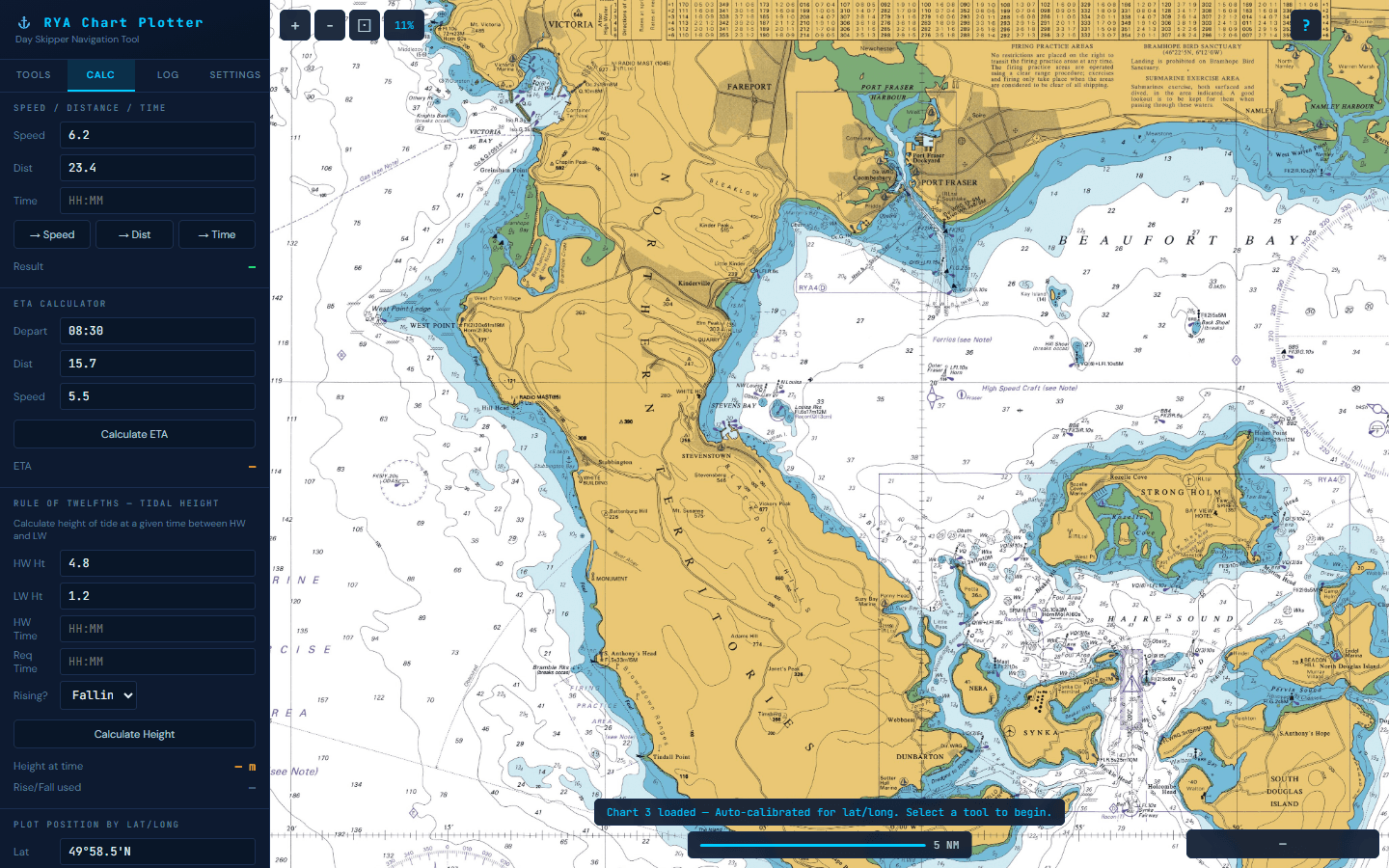
Built-in Navigation Calculators
Four calculators handle the maths that comes up constantly in RYA chartwork exercises. No more reaching for a separate calculator or scribbling in the margin of your chart.
- Speed / Distance / Time — solve for any unknown
- ETA Calculator — enter departure time, distance, and speed
- Rule of Twelfths — calculate tidal height at any time between HW and LW
- Lat/Long Plotter — enter coordinates and mark the position on the chart
ChartWork vs. traditional tools
Same navigation skills. Better way to practise them.
Up and running in 30 seconds
Open ChartWork
Click "Start practising" — no signup, no download, no installation. The chart loads straight in your browser.
Select your tool
Choose from 12 navigation tools: bearings, CTS vectors, DR/EP, dividers, routes, fixes, and more. All keyboard-shortcut enabled.
Plot on the chart
Click directly on Training Chart 3 to plot, measure, and calculate. Drag handles to adjust. Everything updates in real time.

Built for students like you
RYA Day Skipper Students
Practising for the theory exam? Master chartwork with the same Training Chart 3 used in your course — without lugging around physical charts and plotters.
Yachtmaster & Coastal Skipper
Revising CTS vector triangles, EP plotting, and tidal calculations? ChartWork handles the complex geometry so you can focus on understanding the principles.
Self-study navigators
Not enrolled in a formal course? The official RYA plotter software requires an activation code. ChartWork is available to everyone.
Instructors & training centres
Demonstrate chartwork techniques on a projector or screen. Students follow along on their own devices. No handing out plotters and dividers.
Simple pricing
One price. Unlimited access. Forever.
No subscriptions. No hidden fees. No upsells.
one-time payment
- All 12 navigation tools
- CTS solver with vector triangles
- DR & EP plotting with tidal streams
- 4 built-in calculators
- Works on all your devices
- Unlimited sessions, forever
One-time payment. No subscription. Unlimited access forever.
Frequently asked questions
Is this suitable for the RYA Day Skipper theory exam?
Yes. ChartWork uses the official RYA Training Chart 3 layout and includes all the tools you need — course to steer, DR/EP plotting, bearings, dividers, and tidal calculations. It's designed specifically for Day Skipper and Yachtmaster theory chartwork practice.
Does it replace my Portland plotter and dividers?
For practice, absolutely. ChartWork gives you digital versions of every tool — bearings, distance measurement, course plotting — with the added benefit of instant verification. You'll still want physical tools for the actual exam if it's paper-based, but you'll be far more confident having practised digitally.
Do I need to create an account?
No. You get 60-second free trial with no signup required. If you decide to unlock unlimited access, payment is handled through Stripe — we'll send you a magic link to sign in on other devices.
Is it a subscription?
No. It's a one-time payment of £10. Pay once, use forever, on all your devices.
Can I use it on my iPad or tablet?
Yes. ChartWork runs in any modern browser — Chrome, Safari, Firefox, Edge. It works on laptops, tablets, and desktops. We recommend a screen of at least 10 inches for the best experience.
How is this different from the RYA's own chart plotter software?
The official RYA plotter (by CHERSOFT) is only available to enrolled students with a single-use activation code. ChartWork is available to anyone — self-study students, people revising before their exam, or anyone who wants to practice navigation chartwork.
Get in touch
Questions or feedback?
Whether you have a question about ChartWork, need help with your account, or want to suggest a feature — we'd love to hear from you. Send us a message and we'll get back to you as soon as possible.
Typical response time: within 24 hours

Ready to practise your chartwork?
Open ChartWork, pick a tool, and start plotting on Training Chart 3. No signup. No download. Just navigation.
Start practising free